Sleep Apps for Better Sleep 3 Top Picks
Discover the three best sleep apps for guided meditations, soundscapes, and sleep analysis. Enhance your sleep with technology.
Discover the three best sleep apps for guided meditations, soundscapes, and sleep analysis. Enhance your sleep with technology.
The 5 Best Sleep Apps for Guided Meditations Soundscapes and Sleep Analysis
Hey there, fellow sleep seekers! In our fast-paced world, getting a good night's rest often feels like a luxury rather than a necessity. But what if I told you that your smartphone, often blamed for keeping you awake, could actually be your secret weapon for better sleep? That's right! Sleep apps have revolutionized how we approach bedtime, offering everything from soothing soundscapes to guided meditations and even in-depth sleep analysis. Forget counting sheep; let's dive into the digital realm of slumber.
We're going to explore five of the absolute best sleep apps out there, breaking down what makes them tick, who they're best for, and even giving you a peek at their pricing. Whether you're struggling with insomnia, looking to deepen your meditation practice, or just curious about your sleep patterns, there's an app for you. Let's get started!
Calm Your Mind with Guided Meditation Sleep Apps
First up, let's talk about apps that excel in guided meditations. These are perfect for anyone whose mind races at bedtime, making it impossible to drift off. Guided meditations help you quiet the mental chatter, focus on your breath, and gently lead you into a state of relaxation conducive to sleep.
Calm App Your Daily Dose of Serenity
Calm is arguably one of the most popular meditation and sleep apps, and for good reason. It's beautifully designed, incredibly user-friendly, and packed with content. While it offers a wide range of meditations for stress, anxiety, and focus, its sleep section is where it truly shines.
Key Features of Calm App for Sleep
- Sleep Stories: These are bedtime stories for adults, narrated by soothing voices (some even by celebrities like Matthew McConaughey!). They're designed to distract your mind from daily worries and lull you into sleep.
- Sleep Meditations: Guided meditations specifically tailored for sleep, ranging from 5 to 30 minutes. They focus on body scans, breathwork, and visualization to help you relax.
- Sleep Music: A vast library of calming music, soundscapes, and white noise to help you drift off.
- Daily Calm: A 10-minute daily meditation to help you start or end your day with mindfulness, which indirectly contributes to better sleep.
Who is Calm Best For
Calm is ideal for beginners to meditation, those who enjoy storytelling, and anyone looking for a comprehensive app that covers both meditation and sleep. It's also great for people who appreciate a polished user interface and a wide variety of content.
Calm App Pricing and Availability
Calm offers a free trial with limited content. The premium subscription, Calm Premium, unlocks everything. It's typically around $69.99 per year or a one-time lifetime purchase for $399.99. Available on iOS and Android.
Headspace App Mindfulness for Better Sleep
Headspace is another giant in the meditation space, known for its approachable and often whimsical approach to mindfulness. While it's primarily a meditation app, its sleep section is robust and highly effective.
Key Features of Headspace App for Sleep
- Sleepcasts: Similar to Sleep Stories, these are audio experiences that combine narration with soothing soundscapes to create a unique bedtime journey. They often describe calming environments.
- Sleep Music and Soundscapes: A good selection of ambient sounds, nature sounds, and instrumental music designed to help you relax and fall asleep.
- Wind Downs: Short, guided exercises to help you unwind before bed, focusing on breath and body awareness.
- Nighttime SOS: Quick meditations for when you wake up in the middle of the night and can't get back to sleep.
Who is Headspace Best For
Headspace is excellent for those who prefer a more structured, educational approach to meditation and sleep. If you appreciate clear instructions, a friendly tone, and a focus on building mindfulness habits, Headspace is a strong contender. It's also great for people who want to understand the 'why' behind the techniques.
Headspace App Pricing and Availability
Headspace offers a free trial with introductory content. A full subscription costs around $69.99 per year or $19.99 per month. Available on iOS and Android.
Drift Off with Soothing Soundscapes and Ambient Noise Sleep Apps
Sometimes, all you need is the right sound to help you relax and block out distractions. These apps specialize in creating immersive sound environments that can transport you to a peaceful state, making it easier to fall asleep and stay asleep.
Sleep Cycle App Smart Alarm and Soundscapes
While Sleep Cycle is primarily known as a smart alarm that wakes you during your lightest sleep phase, it also offers a fantastic array of soundscapes and sleep aids to help you drift off.
Key Features of Sleep Cycle App for Sleep
- Sleep Aid Library: A collection of carefully curated sounds, including nature sounds (rain, ocean waves), white noise, ASMR, and even guided meditations.
- Sleep Notes: Allows you to track factors that might affect your sleep, like caffeine intake, stress, or exercise, helping you identify patterns.
- Smart Alarm: This is its flagship feature. It analyzes your sleep patterns using your phone's microphone (or accelerometer) and wakes you gently during your lightest sleep phase within a customizable wake-up window. This helps you feel less groggy.
- Sleep Statistics: Provides detailed graphs and data on your sleep quality, sleep duration, and sleep consistency.
Who is Sleep Cycle Best For
Sleep Cycle is perfect for those who want to understand their sleep patterns better and wake up feeling more refreshed. If you're looking for an app that combines soundscapes with insightful sleep analysis and a smart alarm, this is a top choice. It's also great for light sleepers who are easily disturbed by sudden alarms.
Sleep Cycle App Pricing and Availability
Sleep Cycle offers a free version with basic alarm and sleep tracking. The premium subscription, which unlocks all sleep aids, detailed statistics, and advanced features, costs around $29.99 per year. Available on iOS and Android.
Relax Melodies App Your Personalized Sound Mixer
Relax Melodies stands out because it allows you to mix and match different sounds to create your perfect sleep soundscape. It's like being a DJ for your dreams!
Key Features of Relax Melodies App for Sleep
- Sound Mixer: Choose from a vast library of sounds (nature, white noise, city sounds, instruments, binaural beats) and adjust their individual volumes to create unique combinations.
- Guided Meditations: A selection of guided meditations for sleep, relaxation, and stress relief.
- Bedtime Stories: A growing collection of stories to help you unwind.
- Sleep Programs: Multi-day programs designed to help you overcome specific sleep challenges.
Who is Relax Melodies Best For
This app is ideal for users who love customization and want complete control over their sleep sound environment. If you enjoy experimenting with different sound combinations and find specific sounds particularly soothing, Relax Melodies will be your go-to. It's also great for those who need a consistent background noise to block out external disturbances.
Relax Melodies App Pricing and Availability
Relax Melodies offers a free version with a good selection of sounds. The premium subscription, which unlocks all sounds, meditations, and stories, costs around $59.99 per year or $9.99 per month. Available on iOS and Android.
Uncover Your Sleep Secrets with Sleep Analysis Apps
Beyond just helping you fall asleep, some apps are designed to give you a deeper understanding of your sleep patterns. They use your phone's sensors to track your sleep stages, disturbances, and overall sleep quality, providing valuable insights that can help you make informed changes to your sleep habits.
AutoSleep App for Apple Watch Comprehensive Sleep Tracking
If you're an Apple Watch user, AutoSleep is a must-have. It's renowned for its comprehensive and accurate sleep tracking, leveraging the Watch's advanced sensors.
Key Features of AutoSleep App for Sleep
- Automatic Sleep Tracking: Once set up, it automatically tracks your sleep without you needing to remember to start or stop it.
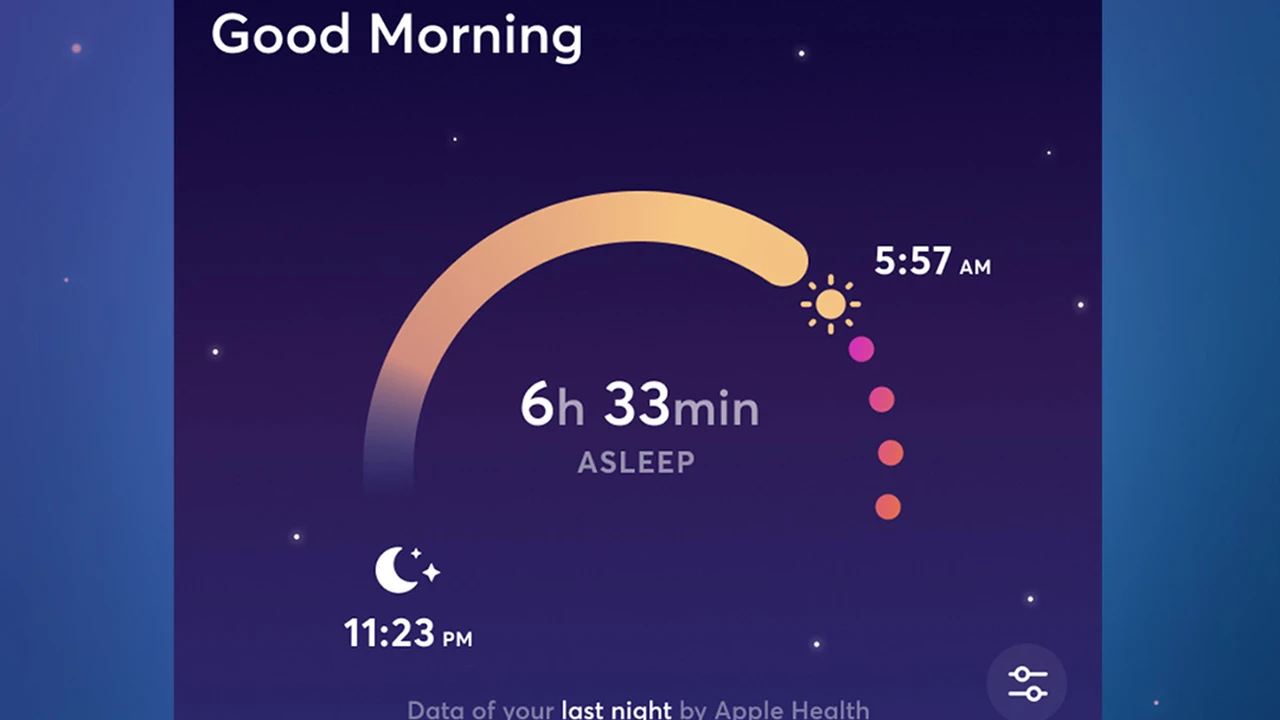
- Detailed Sleep Metrics: Provides in-depth data on sleep stages (deep, light, REM), sleep quality, heart rate during sleep, restlessness, and oxygen saturation (if your Watch supports it).
- Readiness Score: Gives you a daily score indicating how rested you are, based on your sleep and activity.
- Smart Alarms and Haptics: Can use your Apple Watch's haptic feedback to wake you silently.
- Integration with Apple Health: Seamlessly integrates with Apple Health for a holistic view of your well-being.
Who is AutoSleep Best For
AutoSleep is exclusively for Apple Watch owners who want the most detailed and accurate sleep tracking possible without needing to wear a separate device. It's perfect for data enthusiasts and those who want actionable insights into their sleep health.
AutoSleep App Pricing and Availability
AutoSleep is a one-time purchase app, typically costing around $4.99. It's available exclusively on iOS (requires an Apple Watch).
Comparing the Best Sleep Apps Which One is Right for You
Choosing the right sleep app depends heavily on your individual needs and preferences. Here's a quick comparison to help you decide:
Feature Comparison Table
| App Name | Primary Focus | Key Features for Sleep | Best For | Typical Pricing (Annual) |
|---|---|---|---|---|
| Calm | Guided Meditation & Relaxation | Sleep Stories, Sleep Meditations, Sleep Music | Beginners, story lovers, comprehensive content | ~$69.99 |
| Headspace | Mindfulness & Meditation | Sleepcasts, Wind Downs, Nighttime SOS | Structured learning, mindfulness building | ~$69.99 |
| Sleep Cycle | Smart Alarm & Sleep Analysis | Sleep Aid Library, Smart Alarm, Sleep Statistics | Data enthusiasts, gentle waking, soundscapes | ~$29.99 |
| Relax Melodies | Customizable Soundscapes | Sound Mixer, Guided Meditations, Bedtime Stories | Customization lovers, specific sound needs | ~$59.99 |
| AutoSleep | Comprehensive Sleep Tracking | Detailed Sleep Metrics, Readiness Score, Automatic Tracking | Apple Watch users, data enthusiasts, accurate tracking | ~$4.99 (one-time) |
Practical Usage Scenarios for Sleep Apps
Let's look at some real-world scenarios where these apps can make a significant difference:
Scenario 1 Struggling with a Racing Mind at Bedtime
User Profile: Sarah, a marketing professional, often finds her mind replaying the day's events or planning for tomorrow, making it hard to fall asleep.
Recommended Apps: Calm or Headspace.
How they help: Sarah could use Calm's Sleep Stories to distract her mind with a soothing narrative, or try one of Headspace's Wind Downs to gently guide her focus away from her thoughts and onto her breath. The guided meditations in both apps are excellent for quieting an overactive mind.
Scenario 2 Waking Up Groggy and Unrefreshed
User Profile: David, a student, gets enough hours of sleep but always wakes up feeling tired and disoriented, especially when his alarm blares.
Recommended App: Sleep Cycle.
How it helps: Sleep Cycle's smart alarm feature would be a game-changer for David. By waking him during his lightest sleep phase within a 30-minute window, he's more likely to feel naturally refreshed and less groggy, even if the total sleep duration is the same. The sleep statistics can also help him identify if certain activities (like late-night studying) are impacting his sleep quality.
Scenario 3 Needing Specific Background Noise to Sleep
User Profile: Emily lives in a noisy apartment building and needs consistent background noise to block out street sounds and neighbor disturbances.
Recommended App: Relax Melodies.
How it helps: Emily can use Relax Melodies' sound mixer to create her perfect blend of white noise, rain sounds, and perhaps a gentle fan sound. She can adjust the volume of each component to precisely mask the external noises, creating a consistent and calming sound environment that helps her fall and stay asleep.
Scenario 4 Wanting to Understand Sleep Patterns in Detail
User Profile: Mark, a fitness enthusiast, tracks all his health metrics and wants to add detailed sleep data to optimize his recovery and performance.
Recommended App: AutoSleep (with Apple Watch).
How it helps: AutoSleep provides Mark with granular data on his sleep stages, heart rate, and restlessness throughout the night. He can see how his workouts, diet, or stress levels impact his deep and REM sleep, allowing him to make data-driven adjustments to his routine for better recovery and overall well-being.
Tips for Maximizing Your Sleep App Experience
Just downloading an app isn't enough; here are some tips to get the most out of your chosen sleep companion:
Consistency is Key for Sleep App Success
Use your chosen app consistently, ideally every night. This helps the app gather enough data for accurate analysis (if it's a tracking app) and helps your brain associate the app's sounds or meditations with bedtime.
Experiment with Different Features and Sounds
Don't be afraid to try out different Sleep Stories, meditations, or sound combinations. What works one night might not work another, or you might discover a new favorite that's even more effective.
Integrate with a Bedtime Routine for Optimal Results
Make using your sleep app a part of a relaxing bedtime routine. This could involve dimming the lights, taking a warm bath, reading a book, and then settling down with your app. This signals to your body that it's time to wind down.
Minimize Other Screen Time Before Bed
While sleep apps use your phone, try to minimize other screen time (social media, emails, intense videos) at least an hour before bed. The blue light from screens can interfere with melatonin production, making it harder to fall asleep, even with a sleep app running.
Adjust Volume and Placement for Best Performance
For sound-based apps, ensure the volume is at a comfortable level – loud enough to be effective but not so loud that it's jarring. For tracking apps like Sleep Cycle, ensure your phone is placed correctly (e.g., on your nightstand or under your pillow, as per app instructions) for accurate data collection.
Sleep apps are powerful tools that can significantly enhance your sleep quality. By understanding their features and choosing the one that aligns with your specific needs, you're well on your way to unlocking the science of sleep optimization. Sweet dreams!
:max_bytes(150000):strip_icc()/277019-baked-pork-chops-with-cream-of-mushroom-soup-DDMFS-beauty-4x3-BG-7505-5762b731cf30447d9cbbbbbf387beafa.jpg)